
Author Archives: wagamama

Benchmark Amazon

Amazon AWS LogoAmazon gave me $100 gift card for AWS services a couple months back. As much as I love the concept of cloud the numbers have never worked out for me. My gift card is going to expire soon, so lets burn up some credits by bench-marking some of their AWS EC2 instances.

I’m most interested in CPU and disk performance of various instances since servers do not need high end graphics. All tests were performed on Windows 2012 R2 Standard Edition (64 bit) using PerformanceTest 8.0 software.

The Amazon pricing per hour is for the N. Virginia area, which I believe is cheapest zone they offer.

Instance Type:

c4.large – 8 ECU – 2 vCPU – 3.75gb RAM – $0.193 per Hour

CPU Mark: 2,708
Disk Mark: 787 (EBS Storage)

c4.2xlarge – 31 ECU – 8 vCPU – 15gb RAM – $0.773 per Hour

CPU Mark: 9,485
Disk Mark: 1,017 (EBS Storage)

c4.4xlarge – 30 ECU – 16 vCPU – 30gb RAM – $1.546 per Hour

CPU Mark: 15,680
Disk Mark: 998 (EBS Storage)

c3.xlarge – 14 ECU – 4 vCPU – 7.5gb RAM – 0.376 per Hour

CPU Mark: oops… have to redo this one
Disk Mark: 910 (2 x 40 SSD)

Non Amazon Systems:

Supermicro – XEON L5420x2 – 16gb RAM

CPU Mark: 4,445
Disk Mark: 1,385 (Samsung 840 EVO 120gb)

Crunching The Numbers
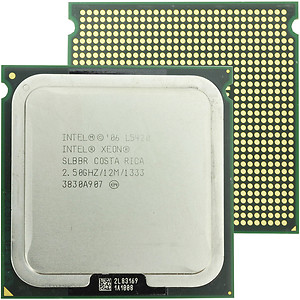
Xeon L5420I want to compare prices of running in the cloud to the Dual Xeon L5420 processors, which are available for very cheap on eBay. Perfectly good used servers, slap some new SSD into them stick them in a datacenter and run them until they die.

The closest match offered by Amazon is the c4.2xlarge class machine, which has a CPU mark of 9,485 vs the dual Xeon’s score of 6,734.

The cost to run in the Amazon cloud would cost you $556.56 per month. That is just the machine, it does not include extras such as a load balancer, VPN or bandwidth.

The cost to run a 1/4 rack (10 machines) would be $5,556.60 per month. If you need and entire rack it would cost you $23,375.50 per month.

You can get your cost down quite a bit if you are willing to commit to a long term agreement of 1, 2 or 3 years with Amazon. Once you commit to a specific instance you can’t change, so calculate your usage requirements before committing.

Another cheap rack of compute power

I think it was about 1 year ago that I setup a rack at a datacenter, filled with servers that had come off lease. You can get them cheap, real cheap vs. a new server.

I read the other day that Intel has not made any ‘major’ improvements to their processors since 2011. Sure there have been some improvements to SATA, SSD’s etc. But when you can buy a server for 10% – 20% of the price of purchasing new, new just does not seem worthwhile.

Last year we used 1U twin Supermicro servers using the the X7DWT-INF motherboard. They came equipped with 2x Intel Xeon L5420 quad core processors and 16GB ram. I looked up the price paid last year, they were $450.

They work fine, way more ram than we need. The only downside is the IPMI management is not always the greatest but we have managed. We even bought extra servers that just sit in the rack, to be used as parts in the event of a failure of any of the old servers. So far the parts machines are just sitting there, no issues with parts.

Now 2015, we want to build another rack – at another datacenter (additional redundancy). Would like to find computers with X8 based motherboards as the IPMI is supposed to be better.

Unfortunately they are still too costly, so we are looking at the exact same model of server that we bought last year. The good news is the price has dropped for $450 per 1U down to $250. Imagine, there are two full servers in 1U for $250. That is really $125 per server, since there are two per 1U. Simply blows my mind, since a new machine would cost you $2,000+ for a server and you don’t get anywhere near the price/performance boost.

Say we put 45 1U units in a rack (that is 90 servers) for a cost without hard drives of $11,250. If we could find new servers, twin models for $2000 (without hard drives) the cost would be $90,000. I doubt you could find servers for $2000 new.

There are no hard drives included with the servers, so SSD will be purchased for most.

A couple servers will be used as database servers, last year we used WD Red drives and attempted to implement read caching using Fusion-IO cards. The caching concept did not work very well, the performance improvement seen was not worth the effort.

Seagate Laptop SSHDSo this year, rather than WD Red (currently $69.99) we are going to try using Seagate Laptop SSHD (currently $79.68).

Now according to benchmarks over at UserBenchmark these 2.5 inch drives do not perform well vs. 3.5 inch drives or SSD (of course). However, if you benchmark them WD Red 2.5 vs Seagate Laptop SSHD they actually perform 58% better overall than WD Red and 161% better on 4K random writes.

Since the workload on the database servers are 90% write, we are going to give these laptop drives a chance.

We still have a Fusion-IO card sitting here unused as well from last year. So we can stick that in one of the DB servers to increase the read side of things. Would not go out and buy one just for this purpose but since it is just sitting here on the shelf, might as well put it in.

LDAP / memcache frustration on DirectAdmin

I have about 5 servers that I maintain to run websites. In addition to the base system that DirectAdmin installs I have a requirement for a few additional modules.

These are memcache and LDAP.

I use Debian x64 and DirectAdmin, to try and keep things the same. So if it works on one, you test it on one… it should work on the others right?

Every time I upgrade PHP I have issues getting these two modules compiled back in (add custom modules).

I upgraded one server to PHP 5.6.8, using CustomBuild 2.0 I enabled LDAP. So my custom/ap2/configure.php56 looks like this, to add LDAP:

#!/bin/sh
./configure \
        --with-apxs2 \
        --with-config-file-scan-dir=/usr/local/lib/php.conf.d \
        --with-curl=/usr/local/lib \
        --with-gd \
        --enable-gd-native-ttf \
        --with-gettext \
        --with-jpeg-dir=/usr/local/lib \
        --with-freetype-dir=/usr/local/lib \
        --with-libxml-dir=/usr/local/lib \
        --with-kerberos \
        --with-openssl \
        --with-mcrypt \
        --with-mhash \
        --with-ldap \
        --with-mysql=mysqlnd \
        --with-mysql-sock=/tmp/mysql.sock \
        --with-mysqli=mysqlnd \
        --with-pcre-regex=/usr/local \
        --with-pdo-mysql=mysqlnd \
        --with-pear \
        --with-png-dir=/usr/local/lib \
        --with-xsl \
        --with-zlib \
        --with-zlib-dir=/usr/local/lib \
        --enable-zip \
        --with-iconv=/usr/local \
        --enable-bcmath \
        --enable-calendar \
        --enable-ftp \
        --enable-sockets \
        --enable-soap \
        --enable-mbstring \
        --with-icu-dir=/usr/local/icu \
        --enable-intl

Great, it works. LDAP is compiled in and everyone is happy.

I go and do the upgrade on the next server, no luck. The compiler for PHP says it can’t find the LDAP files. I check what ldap modules are installed on both machines with this:

dpkg-query -l '*ldap*'

Both machines show different results, the packages are mostly the same, but not exact. In fact the output of the dpkg-query is not the same, one shows an Architecture column and one does not. Hmmm… is one 64 bit and the other 32… checking on that… nope, both are 64 bit.

In the end on the machine with the issue where it says it can’t find the LDAP files I created a symlink to a ldap file I found.

ln -s /usr/lib/x86_64-linux-gnu/libldap-2.4.so.2 /usr/lib/libldap.so

That was enough that it could compile and things seem to be working, but super frustrating that there are so many differences on machines where I try and keep things the same.

To have DirectAdmin monitor the status of the memecached instance you can add it to /usr/local/directadmin/data/admin/services.status and DirectAdmin will start/restart if necessary.

The DA guys document it here: http://www.directadmin.com/features.php?id=487

PHP Memcache Sessions & Redundancy

I started using memcache to store sessions, rather than having PHP store them on disk. The server hard drives are SSD so I never noticed any performance issue sorting them on disk, but I did not like all those files filling up my /tmp space.

Once moved to memcache, then you have the issue of redundancy. If you have more than one server handling your traffic load, you need something to maintain a sticky session or the user would be logged out of your site (or session information lost) if they move between servers.

Doing some reading there seems to be a lot of bad information out there about exactly how to setup session redundancy across multiple memcache servers.

On a lot of sites I found this syntax to use:

tcp://127.0.0.1:11211?persistent=1&weight=1&timeout=1&retry_interval=15

I think that syntax is not correct, but it is that way on many sites. According to the documentation you would not encode the &. In addition all the values they are listing are the defaults. So odds are good those params are not valid like that, but it still works because the values are the default.

One of the better articles I found online was this one at DigitalOcean.

How To Share PHP Sessions on Multiple Memcached Servers on Ubuntu 14.04

His configuration is a bit different than mine, since the OS is different. A couple things to emphasize if you are trying to set this up.

In his example using three servers he says to place the following on each server:

session.save_path = 'tcp://10.1.1.1:11211,tcp://10.2.2.2:11211,tcp://10.3.3.3:11211'

The order here is important, I think a lot of people will want to change the order of the servers, placing the local server first. Don’t do that! In order for the redundancy to work correctly the session.save_path must be the same on all servers. Do not worry about the order, as PHP must contact each server to write the session data anyway.

Multiple Locale Website

This week I am experimenting with multiple languages in PHP based websites. The process is of course not so straight forward, so I am documenting some of what I am doing to get a server setup.

I am using GNU’s GETTEXT and Poedit, in order to get these things running you need to prep the server first. Gettext is well supported in PHP, which is why I am going that route.

On my debian server, I must first install gettext. I just installed the package.

apt-get install gettext

If you want to support a specific language, it must be a supported locale in the host OS as well.

In most linux distributions you can get a list of currently installed languages using:

locale -a

If you try and use gettext with a language that is not supported, it will not work.

On debian to install another supported language, it is fairly easy (I like easy) if you run:

dpkg-reconfigure locales

Then just select the locales you want to support and it takes care of the rest. Doing a locale -a again you should see your newly added languages.

Boosting Old Technology – Can Caching Help?

I have written a few times about some older Supermicro servers I am working with recently.

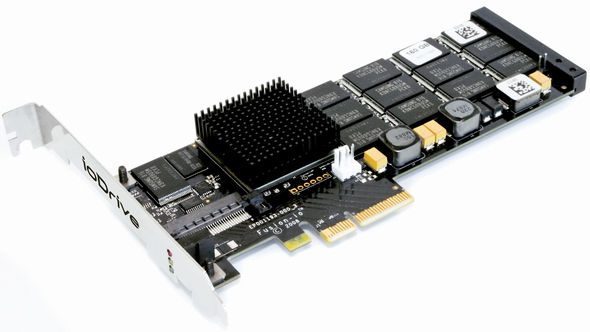
Since the setup I built has 4 x 1tb hard drives (spinning kind), and no space for an SSD to use as cache I bought a used 160gb Fusion-IO ioDrive on eBay.

I had been running Debian on the server. The drivers/software for the Fusion-IO under Linux were a bit restrictive, requiring a specific distro and kernel. I could not find any free/cheap caching software to use under Linux that actually worked. I found some open source stuff, it just did not work.

The Hardware/Software Setup

Why the switch from Debian to Windows?

  1. Fusion-IO setup under Windows is much easier
  2. Availability of Intel’s caching software
  3. Being able to easily run any version of mySQL

The server getting the upgrade powers a database – nothing else. The hard drives use the onboard Intel RAID controller, operating in RAID 10, which based on my previous testing gave the best write performance while providing redundancy.

The workload is 90% write, with no users sitting waiting for writes to complete. Write performance still needs to be quick to keep up with the transaction volume. Users do not want slow reads either – of course.

Ideally I would have a Fusion ioDrive big enough to hold all the database files, but that is not financially possible.

Currently the live data on the database is about 110+ gigs. Technically that would fit on the 160gb Fusion ioDrive. As the database grows, there could be issues.

Intel LogoThe Intel Cache Acceleration Software provides read caching only, it operates in write-through mode to populate the cache – write-back is not available in the software but I would probably not use it anyway due to the increased risk of data loss in the event of a crash or power failure.

Lets find out what a PCI based SSD can do with some caching of those spinning disks. All tests were done on the server, with no users connected. The database was restored for each test, automatically populating the cache if caching enabled.

110+ Gig Database Restore

  • 2 hours, 57 minutes – Restore to RAID 10 (no caching)
  • 3 hours, 10 minutes – Restore to RAID 10 (with caching)
  • 2 hours, 7 minutes – Restore to Fusion-IO storage (no caching)

Sample Reads

I conducted a number of read tests, accessing various databases running reports and user queries. The same queries were run for a tests after a fresh database restore. Some queries make full use of indexes, some do not.

  • 22.54 seconds – Read from RAID 10 (no caching)
  • 22.62 seconds – Read from RAID 10 (with caching)
  • 21.57 seconds – Read from Fusion-IO storage (no caching enabled)

Surprised by those numbers?!? I sure am, underwhelming to say the least. Time to do some research into why the performance is so bad when it should be no much better, both when using cache and when direct from the Fusion-IO card.

Testing The Disks

RAID 10

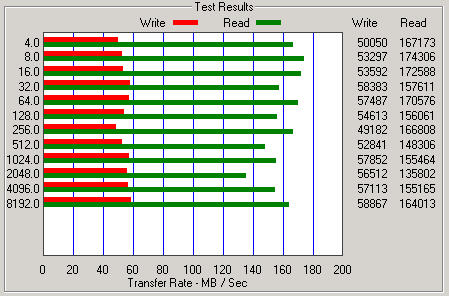
A previous benchmark on this exact same hardware, but with a different version of Windows showed a maximum write speed of 138 MB/sec. Now running the same benchmark software, on the same hardware but a different version of Windows it is maxing out at only 58 MB/sec. Things get more and more strange today.
RAID 10 - Slow

Fusion-IO ioDrive

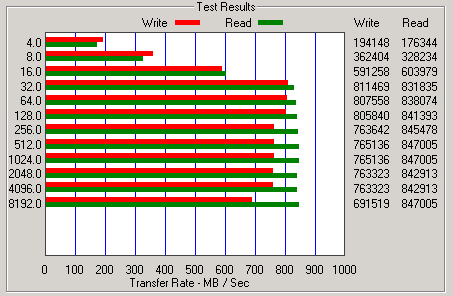
I have no previous benchmark for this one, but the current graph shows speeds that I would expect from this PCI memory card. An impressive maximum write speed of 811 MB/sec. and a read speed of 847 MB/sec.
fusion-io-benchmark

With a write speed increase of 1360% over the spinning disk, why is the mySQL restore only 39% faster when restoring to the Fusion-IO disk?

Super Micro IPMI Firmware – X7DWT-INF

supermicro-logoI am managing a rack of Super Micro servers, the motherboard model is X7DWT-INF with built in IPMI using a AOC-SIMSO+ card.
The servers are old – quite old, but still perform their designated tasks just fine.

The rack contains a mix of Windows & Linux servers.

iodriveI wanted to convert one of the Linux servers over to Windows 2008 (the latest Windows OS supported by the board) to test out the performance of a Fusion-IO ioDrive (also old technology).

Despite having installed all the operating systems on this rack of Super Micro boards, getting Windows 2008 installed via IPMI was quite difficult. The system would install until the graphical interface showed up – then I lost all mouse or keyboard control.

Tried everything I could think of, no luck. Maybe there is a newer firmware than is installed on this machine? The AOC-SIMSO+ had firmware 1.60 installed, after hours of searching I found that 1.64 was available but I could not find any release notes anywhere.

Don’t know what the difference in firmware is, but it seemed to have fixed my problem. Just for my own future reference I am leaving a copy of the 1.64 build here… with such old computers Super Micro has sorta pushed the firmware to the back of their site so it is difficult to location.

I’m still looking for the latest firmware for the motherboard itself…

Is Windows Slowing Down Your Internet?

This post does not apply to most people, but if you have high speed Internet – it might. My daily driver is a 300 Mbps fiber line. It is fast and I can saturate the link but it takes multiple connections to do it (quite a few connections actually).

If I download a file single file via the web or FTP I might get 30 Mbps per second. That is fairly quick but it is a lot less than 300.

If I download two files at once, from the same remote server both files will come down at 30 Mbps for a combined speed of 60 Mbps.

If you are in the same situation, the problem is probably related to your TCP receive window. The TCP window combined with the distance in MS you are away from the source server determines your maximum download speed.

I found a great article that someone wrote that explains both the calculations of your maximum download speed potential – AND how Windows may actually be limiting your download speed. Yes, it is true!

After reading the article, titled How Windows is Killing Internet Download Speeds I learned that indeed Windows was limiting my connection speed.

I saw major speed increases when downloading from a server that was far away from me. Why Windows limits your connection speed is unknown to me, but simply by executing this:

netsh interface tcp set heuristics disabled

I was able to remove the limit and now download at full speeds.

Windows Display Scaling

I needed a new laptop (have not had one for years) and a nice Dell was just announced at CES 2015 – the XPS 13 2015 model.

Dell XPS 13It has a super thin design, three processors to choose from and a super high resolution display option with a maximum resolution of 3200 x 1800. Their base model has a resolution of 1920 x 1080.

Got the new laptop a couple days ago, it defaults to a resolution of 3200 x 1800, it needs to use Windows desktop display scaling at 200% or everything on the screen is so small you can’t read anything unless you are superman.

At this point I don’t see the advantage of a high resolution display and then having to boost everything up by 200%. Essentially you are reducing your screen resolution though the enlargement process. What happens if you try and enlarge a photo, have you ever tried it? You loose resolution of the photo, you can’t create something out of nothing.

When an application does not specifically support display scaling the application ends up looking very blurry. My main text editor for development is Suplime Text, the latest non beta is version 2… it does not support display scaling so the text is blurry and impossible to work with (it is supported in the newer beta builds).

I tried explaining this to a friend but he did not get the point, suggested I may need glasses. So here are a couple screen shots to demonstrate the problem, without using display scaling. A firefox browser is on the screen, sized to 1024×768 on both screen shots so you have a point of reference on both images.

1920 x 1080 No Display Scale

1920 x 1080 No Display Scale

This resolution may actually be a little small on a 13 inch screen for some. I still have 20/20 vision despite my age and decades of 8+ hours of computer usage every day so the resolution seems about right for me.

3200 x 1800 No Display Scale

Notice how much smaller the firefox window is in the second screen shot – and look at the desktop icons and the icons in the toolbar on the bottom. On a small 13 inch screen they are impossible to see, even with 20/20 vision.

There is nothing wrong with the product itself, the issue is putting a high resolution display in such a small screen. If you take a high resolution display and need to zoom everything up 200% so you can see it, why bother with the high resolution display?

I paid a premium to get this model laptop, but in the end it is not worth it. A native screen resolution of anything higher than 1920 x 1080 in a 13 in inch display just seems wasted.

MySQL replication woes – error 1236

I have been using MySQL replication for years, specifically multi-master where you can do both read and write to either server.

mySQL_Dock_Icon_by_Presto_XTo make my situation even worse, I do it across the global Internet. The added latency and/or outages between sites can cause ‘issues’ that you might not see if your servers were connected locally with high speed Ethernet.

This weekend one of my servers lost a hard drive. One of the NEW WD red hard drives, I just wrote about a few weeks ago. The drives have only been in production for less than two months and one has failed already.

Using Linux software RAID, the data is OK and the machine is still humming along while we wait for a replacement drive to be installed.

One thing that did not survive the hard drive crash is the MySQL replication. The other server (the one where no hard disk crashed) actually started showing this error after the replication stopped:

Got fatal error 1236 from master when reading data from binary log: ‘binlog truncated in the middle of event; consider out of disk space on master; the first event ‘mysql-bin.006259’ at 2608901, the last event read from ‘/var/log/mysql/mysql-bin.006259’ at 2608901, the last byte read from ‘/var/log/mysql/mysql-bin.006259′ at 2609152.’

They suggest out of disk in the message, but not the case here. The problem was probably from the server being restarted without being properly shut down (a big NO NO).

So if you get this error, or any other replication error that references a binlog and a location how can you find out what the problem is?

If you have been running MySQL replication for any length of time, you have seen times where the replication stops and you need to know why.

To view the transaction that is killing your server, head over to the master server and use the mysqlbinlog utility to view what is going on.

In my case I was greeted with this message.

# Warning: this binlog is either in use or was not closed properly.

Essentially it is saying the file is messed up, with no valid content in that file the replication is stuck. To get it started again you will need to update your slave(s) with a new instruction, telling them to move to the next binglog. I advanced to the next binlog like this:

STOP SLAVE;
CHANGE MASTER TO MASTER_LOG_FILE = 'mysql-bin.006260';
CHANGE MASTER TO MASTER_LOG_POS = 0;
START SLAVE;

With that the slave can start up again, reading from the next binlog which contains valid content.

Crisis diverted, all we need now is a new hard drive and the server should be a happy camper once more.