Author Archives: wagamama

apt-config: /usr/local/lib/libz.so.1: no version information available (required by /usr/lib/libapt-pkg.so.4.10)

I get an email daily from cron on a few of my directadmin servers. No idea what it means or what that cron job is even supposed to be doing.

After searching around on the net there are a lot of people with the same issue.

Some of the suggested fixes do not sound very nice, like making some hacks to custombuild and then rebuilding every piece of software on the system. That simply sounds dangerous!

I found this blog post where the author deletes multiple copies that exist on his system and then create link to the correct version.

That sounded not so dangerous so I gave it a try and it worked. In my case I only had /usr/local/lib/libz.so.1.2.3 not /usr/local/lib/libz.so.1.2.3.4 so my solution looked more like this.

rm /usr/local/lib/libz.so.1
ln -s /usr/lib/libz.so.1.2.3 /usr/local/lib/libz.so.1
Compiling DNSDB Exim on Debian Wheezy Directadmin

About 1.5 years ago I did a posting with easy instructions to compile in a custom build of Exim on Directadmin.

Since then I upgraded to Debian Wheezy and Exim has been upgraded to 4.84. The step-by-step instructions don’t work anymore as a result.

Here is an updated version of those instructions.

First, ensure you have the required dependencies.

apt-get install libdb5.1-dev libperl-dev libsasl2-dev

Change all occurrences of 4.84 to the version you want to use. The sample pulls Exim from some mirror, you might need to lookup a working URL to a mirror if this one goes down.

wget http://exim.mirrorcatalogs.com/exim/exim4/exim-4.84.tar.gz
tar xvzf exim-4.84.tar.gz
cd exim-4.84/Local
wget http://www.directadmin.com/Makefile
perl -pi -e 's/^EXTRALIBS/#EXTRALIBS/' Makefile
perl -pi -e 's/HAVE_ICONV=yes/HAVE_ICONV=no/' Makefile
perl -pi -e 's/^#LOOKUP_DNSDB=yes/LOOKUP_DNSDB=yes/' Makefile
cd ..
make
make install

The above commands will download the unmodified source for exim, extract it, download a makefile from the directadmin servers, use a perl command to adjust the makefile, compile and install the fresh exim build.

The file that is created is /usr/sbin/exim-4.84-1, so we must change the name and overwrite the existing exim file.

/etc/init.d/exim stop
cp -f /usr/sbin/exim-4.84-1 /usr/sbin/exim
chmod 4755 /usr/sbin/exim
/etc/init.d/exim start

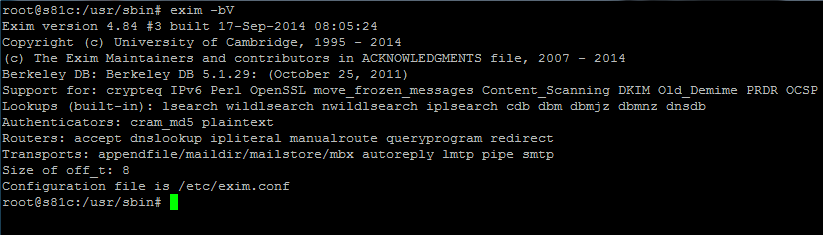
To verify you have a working Exim with DNSDB compiled in do the following:

exim -bV

Exim 4.84

Testing NO RAID vs RAID 5 vs RAID 10

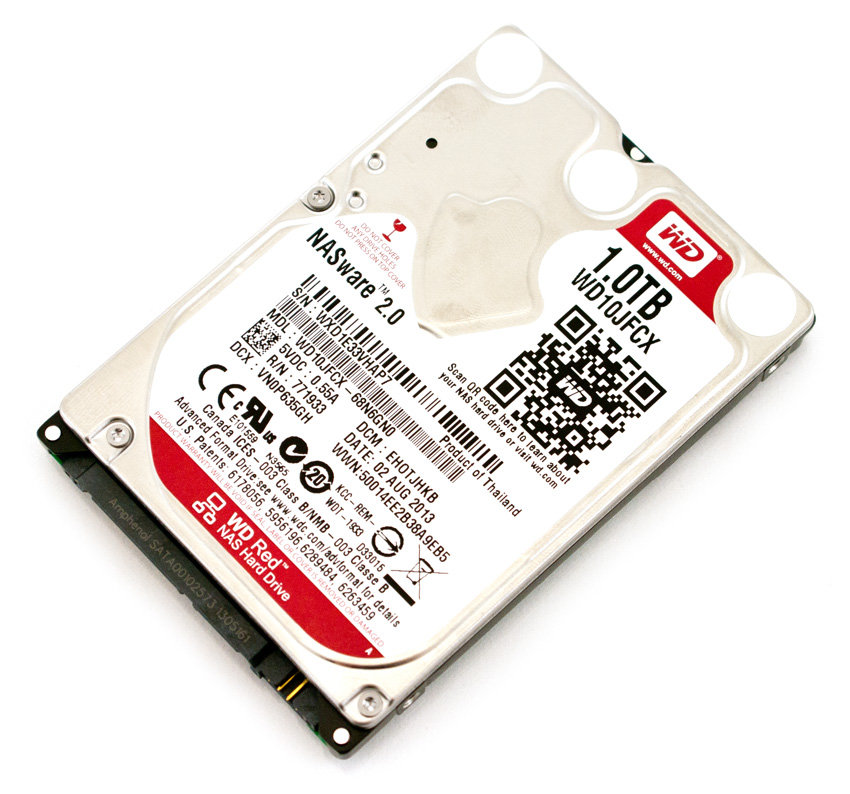
WD-Red-1TBI am setting up a new server, with four 2.5 inch hot swap 1tb WD Red disks – model WD10JFCX. Write performance is key in this setup as 90% of the workload is putting data to disk.

SSD drives would be nice, but not cost effective to get the space needed. I suspect the best option is going to be RAID 10, but lets run a few tests first.

No RAID

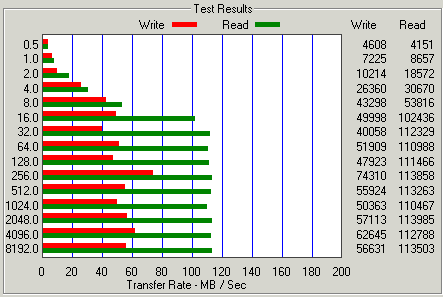
Testing with a single drive gives us a max. write speed of 74 MB/Sec and maximum read speed of 113 MB/Sec which is not very impressive.

Single Drive

RAID 5

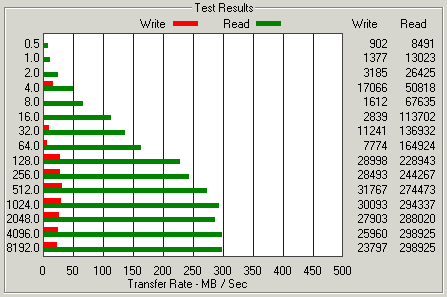
Next up, a four disk RAID 5 setup – the performance is BAD! You do gain quite a bit of read performance maxing out at just under 300 MB/Sec but the write performance has taken a major hit vs. a single drive coming in at only 31 MB/Sec.

Raid 5

RAID 10

Now lets check out RAID 10, which should be the fastest configuration out of the bunch. The downside is you need at least four hard drives and you loose 50% of your capacity to redundancy.

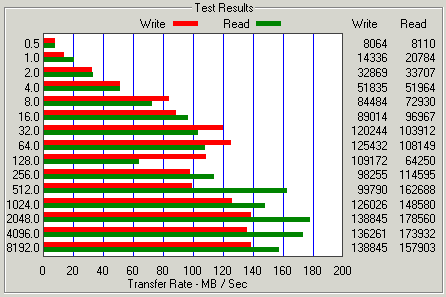
As expected the performance is about double what we get from a single drive. Maximum write comes in at 138 MB/sec and maximum read is 178 MB/sec. The read did not increase by double, but the performance did improve for sure over a single drive.

If your workflow is mostly read the RAID 5 configuration actually performs better. I suspect the more drives you have in your RAID 5 configuration the faster it would probably get since you have more spinning heads.

raid-10

For our write intensive workload we will be going with the RAID 10, which is very slow vs. SSD but the cost of SSD would be over $1,000 for the same space. These 1tb WD Red drives we are using currently cost about $75 each. By using RAID 10 we get the fastest write performance and quite a bit of redundancy.

WD RE4 series benchmark.

So I was curious after doing that benchmark test on my SSD’s in RAID 0.

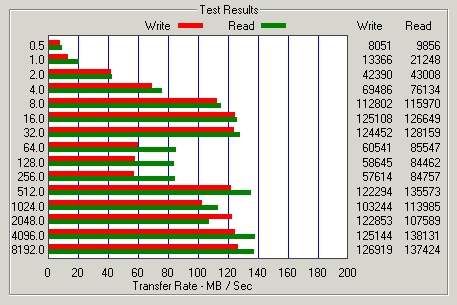
I ran the benchmark on a server that has a 1TB WD RE4 series disk. They claim 128 MB/s sustained from the disk.

My benchmark of the drive confirms their claim.

WD RE4 Benchmark

The drive maxed out at about 127 MB/s write and 138 MB/s on the read. I guess that is a fast drive, but is left in the dust when put up against an SSD and blown away totally against SSD in RAID 0.

Single Drive vs Raid 0

Every computer nerd knows RAID 0 is quick. My most recent computer (now about 1 year old) I put in three SSD drives operating in RAID 0 – I wanted quick.

I had an extra drive come out of another machine so I stuck it in there, but as a stand alone drive where I just put temporary files etc.

I was doing some reading today about different raid levels and performance. If you need redundancy RAID 10 seems to be the fastest option so that is what I will be using in my next batch of servers.

I never bothered to benchmark them before, I just knew that RAID 0 was faster. Is there an actual difference? Lets find out.

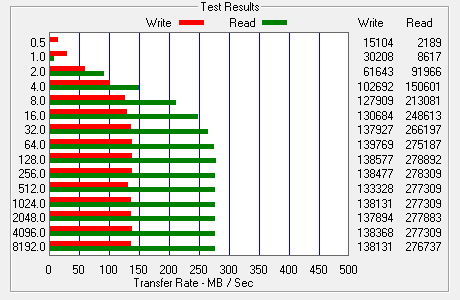
Performance of single SSD

The single SSD maxes out with a write speed of 138MB/sec with a read speed of 276MB/sec. That is quite snappy. I’ve seen laptop hard drives that can only do in the 12MB/sec, those laptops are painful to use.

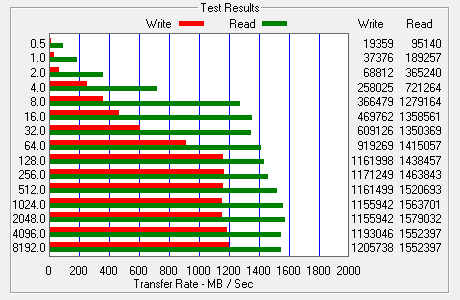
Performance of three SSD in RAID 0

RAID 0 with three SSD disks. A max write speed of 1205MB/sec and a max read speed of 1552MB/sec – incredibly fast!

Interesting how the write speed closes the gap when you have multiple disks. Bottom line, running disks in RAID 0 does make a considerable difference! Even more interesting is how the performance increased by more than three times!

I used the free benchmark software from ATO Tech to do the testing.

RAR & UNRAR on Linux

Seems linux people don’t like RAR very much, it is not easy to install from most package managers it seems. Some used to have it, then removed it because it was not free.

Then some people come up with limited free versions etc. etc. I ended up just getting it direct from the source @ rarlab.

Move to your tmp folder and download from rarlab site.

cd /tmp
wget https://www.rarlab.com/rar/rarlinux-x64-5.8.b1.tar.gz

Extract the downloaded file (extracts to rar folder).

tar -zxvf rarlinux-x64-5.8.b1.tar.gz

Move the files to your /bin folder so you can execute rar and unrar from anywhere on your system.

cp rar/rar rar/unrar /bin

That’s about it. Now you can actually use the full power of rar on your linux box.

PHP 5.3 still shipping with DirectAdmin

PHPI don’t know why but DirectAdmin still rolls out with PHP 5.3 which was released in June 2009. It is now June 2014, how about an upgrade?

You might not want to jump to PHP 5.5 because it deprecates a bunch of the ‘old way’ of connecting to mySQL.

But is it safe to move to 5.4? If you want to find out and are running DirectAdmin, you can update with custom build like this:

cd /usr/local/directadmin/custombuild
./build update
./build set php5_ver 5.4
./build php n

Is your system still going to work? Guess you will have to upgrade and find out.

If you had installed any extensions that you compiled, odds are good they will no longer function because they were compiled for another version.

I ended up having to redo LDAP (which I compiled right in) and I had to redo APC and memcache as those were broken as a result of the PHP version upgrade.

To quickly fix memcache I just did the following to commands

pecl uninstall memcache
pecl install memcache

SSL & Server Name Indication

I recently put a request in to one of the datacenters where I have servers for an additional IP address. Of course they ask what is it for?

An SSL website was the reply…

I got back a note that we do not provide additional IP addresses for SSL anymore.

HU?

So there must now be a common way to put SSL on a shared IP, news to me.

Turns out it is called Server Name Indication which allows the hostname of the request to be included in the SSL handshake.

Turns out you can do it with DirectAdmin can do it, with a bit of tweaking. Looks like I will be putting SNI on my list of things to test.

QNAP & Cron – How To Persist A Reboot


QNAP makes a nice line of NAS machines. I had one that the power supply died on it after only a few weeks but other than that have never had an issue with any of them in service.

Not everything is so straight forward on them however, especially cron. If you have done any work on a Linux box you have encountered cron. Most people edit cron jobs using a web interface for their hosting company, but QNAP boxes are not hosting companies… You would probably try crontab -e to edit the list of jobs right?

Problem is, changes you make do not persist across reboots. A real pain-in-the-butt if you forget that and reboot to find out your jobs are not running like you thought they were.

The trick is you must directly edit /etc/config/crontab file, make your changes there and they will then persist across reboots OK.

QNAP has done a WIKI page about editing cron jobs on their website.

Oh no, Microsoft says Windows 2003 is dead!

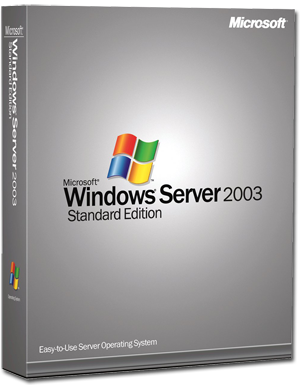
windows-server-2003Microsoft has announced July 14, 2015 as the end of support for Windows Server 2003. Since there will be no support, patches, or security updates for your servers running Windows Server 2003 you might find yourself between a rock and a hard place.

I for one still have production servers that are running Server 2003, it has proven to be a very stable operating system for some systems.

If you still have systems running 2003, you might want to start planning your upgrade path. Leaving 2003 systems in production past the end of support could leave you with your pants down.