Author Archives: wagamama

Configuring PLEX on Amazon Firestick

The following steps document the setup of PLEX on an Amazon Firestick, as of December 2021. These will certainly be outdated as Amazon’s interface continues to change.

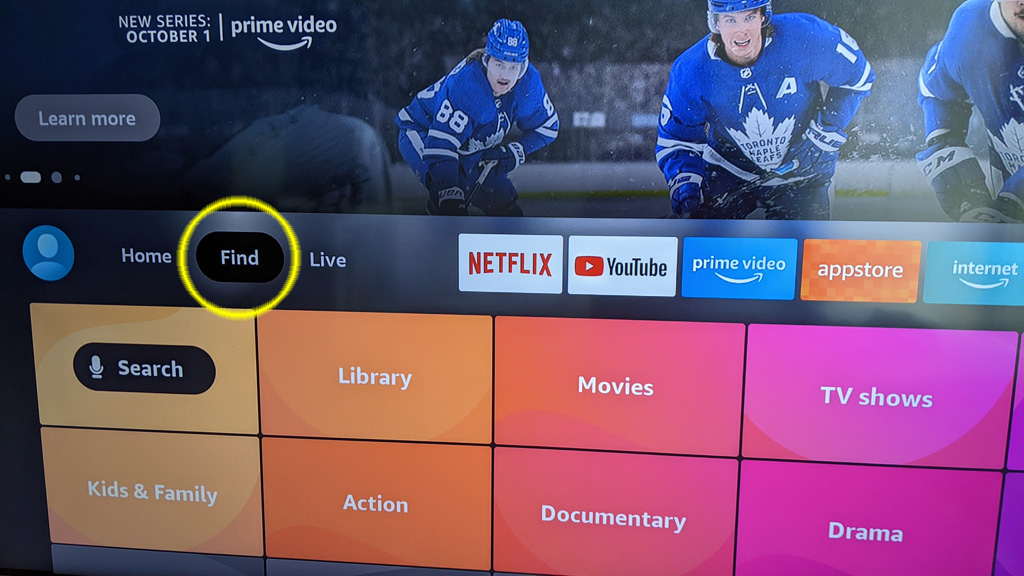
Step #1 – Load the search box

We are going to open the search box, select Find to get started.

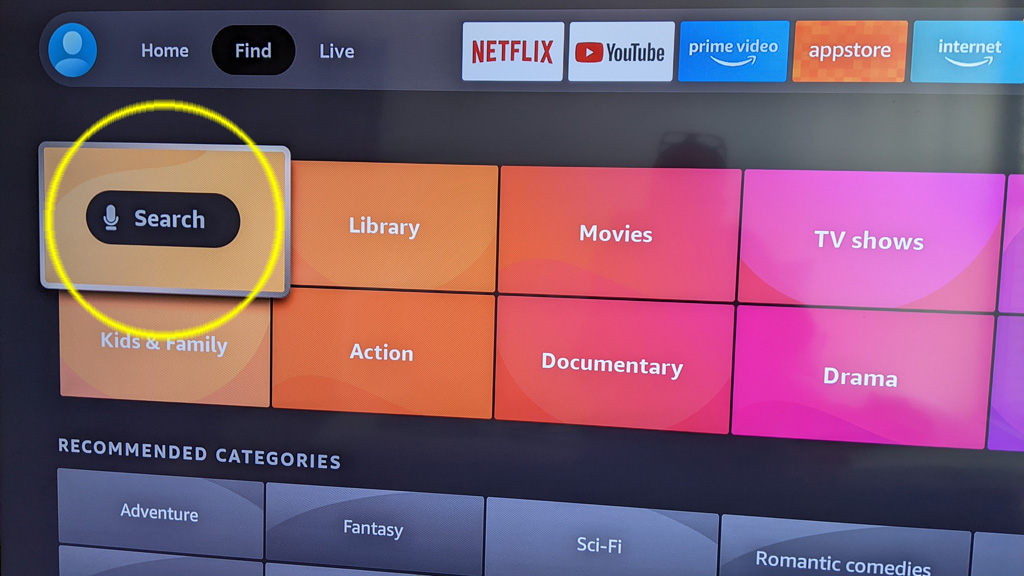
Step #2 – Search for PLEX

Select the search option and search for the word PLEX.

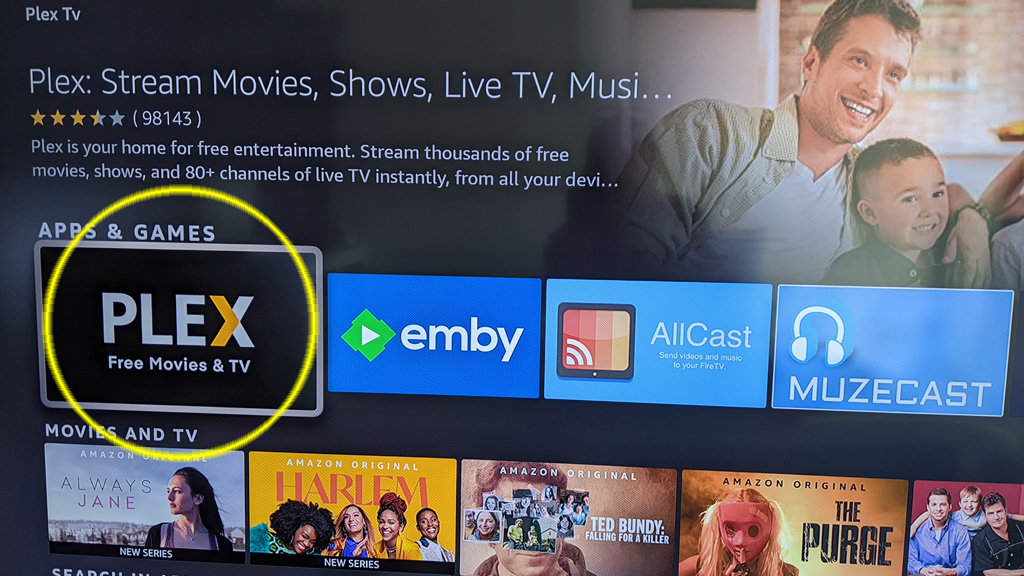
Step #3 – Finding the software

Look for an app with an icon as in the photo below, that is the PLEX app that you want to install on your Firestick.

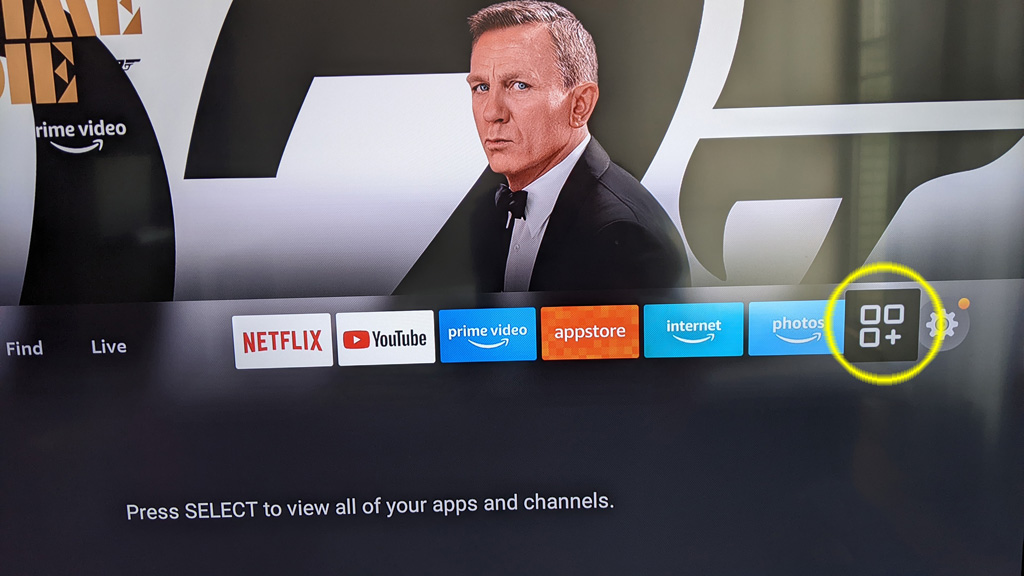
Step #4 – Position PLEX on your quick access bar.

Since you will be using PLEX a lot on your TV, lets move it to your quick access bar (if it is not there already). To do that, select the apps icon, which appears on the right side of the quick access bar.

Step #5 – Move PLEX to front

Once on your apps page, find PLEX and highlight the icon using your cursor – but do not select it. If you accidently select it, it will open and that is not what we want right now so hit the Home button on your remote and start again from Step #4.

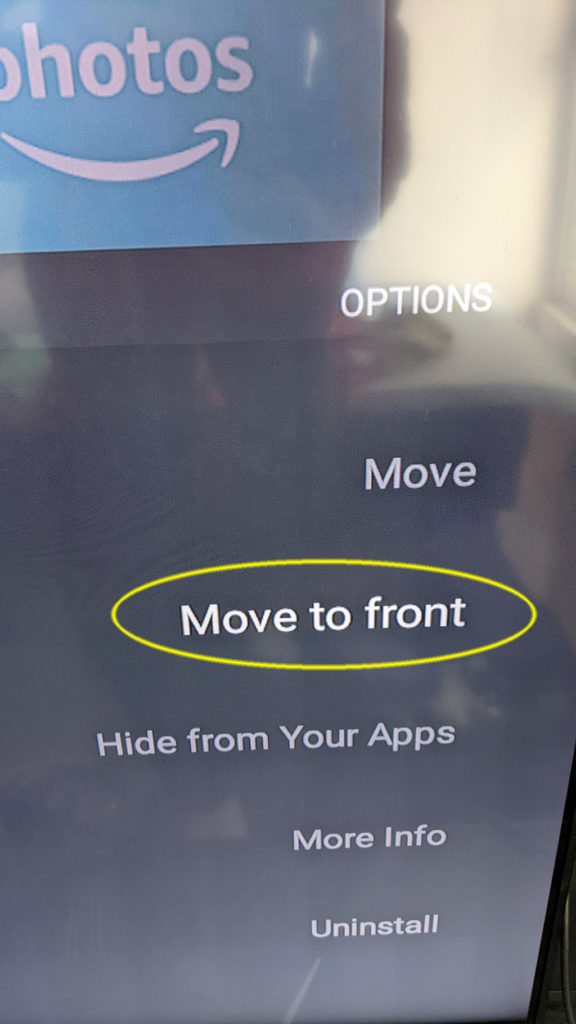
With PLEX highlighted, press the hamburger button on your remote. The hamburger button is a button with 3 (or 4?) horizontal bars.

This will bring up a little menu on the right side of the screen. Select the Move to front option and it will position PLEX at the front of your quick access bar on the Firestick homepage.

Step #6 – Launch PLEX

At this point, PLEX should be installed and easily accessed from your quick access bar. Lets jump back to the homepage, press the Home button on your remote (looks like a little house?).

PLEX should appear as the first item on your quick access bar, select it to launch PLEX.

Step #7 – Sign In

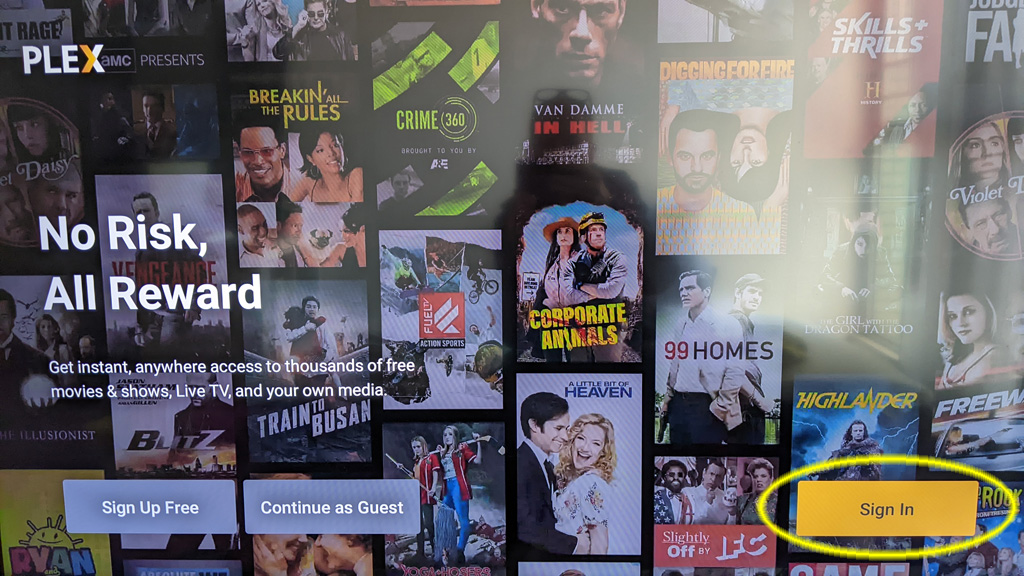
With PLEX opened the 1st time, they want you to login so they know who you are. I have already created an account for you.

From the 1st page, move the cursor over to Sign In and select it.

Step #8 – Authentication

If you have made it to this point, you will be asked to visit some other URL and enter some weird numbers. Please call me to complete this step for you.

Anti-Slip Boots

A random YouTube suggests video thought I would be interested in winter boot slip testing. A lab in Ontario is doing the testing of winter boots, they post all their results on a website that is free to view (unlike Consumer Reports stuff): Rate My Treads

A quick glance at their site, I think I would go with Marks Rundle Waterproof Hyper-Dri 3. Quite a mouthful, but they are affordable and at least get some positive vibes on the Rate My Treads site.

My OTA / Cord Cutting TV Setup

A year+ ago I wanted to try and setup OTA TV. I’m not exactly a cord cutter as I actually have never subscribed to Cable TV in my life.

However, some people in my household wanted access to local news… so my quest began.

Vernon BC – Broadcasters

I will focus this article specifically to Vernon BC as that is where my antenna is located.

Broadcast Tower

The entire city has coverage from rebroadcast tower located on Turtle Mountain (I think that is what it is called), North of Davison Orchards at about 800m. The distance is about 3km to the center of Vernon. Plenty close enough for most any antenna to pickup the signal, there are technically two channels:

  • Channel 20 – CHBC-DT-2
  • Channel 22 – CHKL-DT-2

Unfortunately, they both broadcast Global Okanagan or Global BC. With an exception of what time the news comes on there is no difference between the two channels.

Having the two channels does not give you extra TV shows. 🙁

The TV Antenna

I purchased a fairly large TV antenna with the plan to mount it not directly to the TV but rather put it in a storage room connected to a DVR that could record TV shows. These days no one wants to tune in at 6:30 and watch the news (and commercials) so a recording system is a must.

There is no such thing as a HD antenna and no such thing as an antenna that can pickup a signal for hundreds of miles away. That is just marketing. Browse over to Antanna Man on YouTube to learn about antennas. I think I paid about $100USD for my antenna and it works just fine.

Since the broadcast tower is quite close, you should not require a massive antenna.

DVR #1 – Tablo

For my DVR / tuner device I initially went for a Tablo, which is produced by a company in Canada. I was interested in this device because there was no ongoing subscription cost, if you are trying to cut the cord why do you want to pay any ongoing monthly fee.

I was also attracted to the fact that you could watch TV from any tablet or smart phone or smart TV in your house. It also allowed access from a remote site over the Internet.

Sounds great, watch TV from YOUR own antenna anywhere in the world – very convenient!

The device works great for viewing in your own home. However, the way they have implemented security for remote access really SUCKS! If you have a 2nd home or cabin at the lake you must physically take the device you want to watch TV on to your primary house. You must authenticate a viewing device (phone, tablet or TV) by putting it on the same network as your Tablo device you authenticate. Then you can watch from a remote site.

It totally sucks if you have a 65 inch TV located in a remote location, it means you would have to physically take your 65 inch TV to the location of the Tablo, authenticate and then take it back.

Imagine having to take your TV from your house in Florida up to Canada to authenticate and then take it back.

That was a deal breaker for me. I dumped the device and tried something else.

DVR #2 – PLEX

At that point I learned about some software named Plex, it is designed for watching TV & movies. Many people watch movies they have downloaded from the Internet using this software (not something I will get into here).

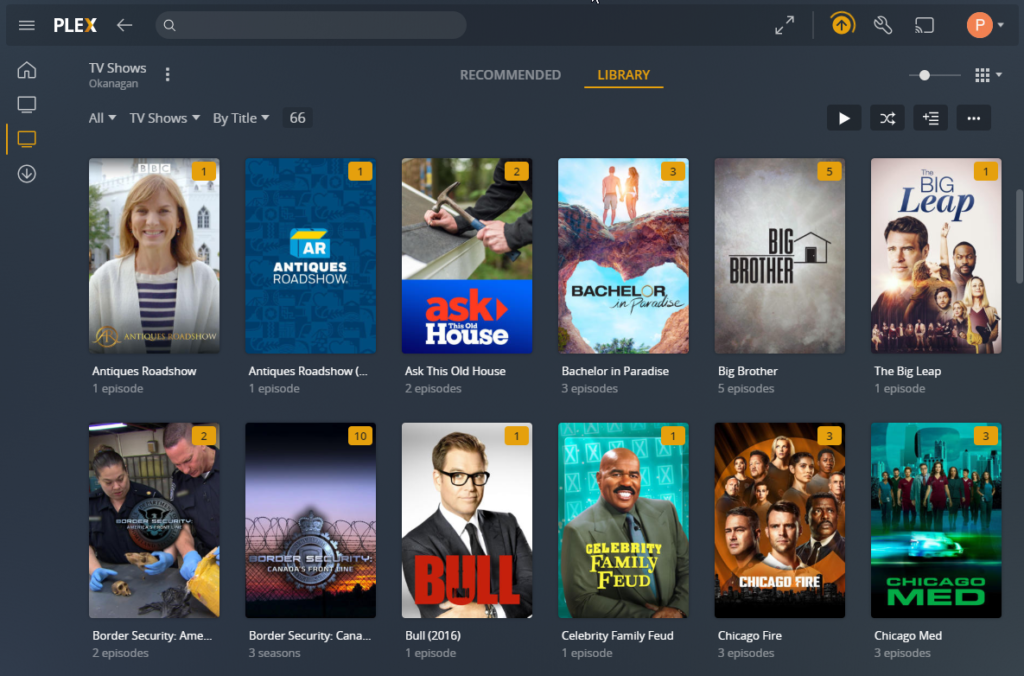
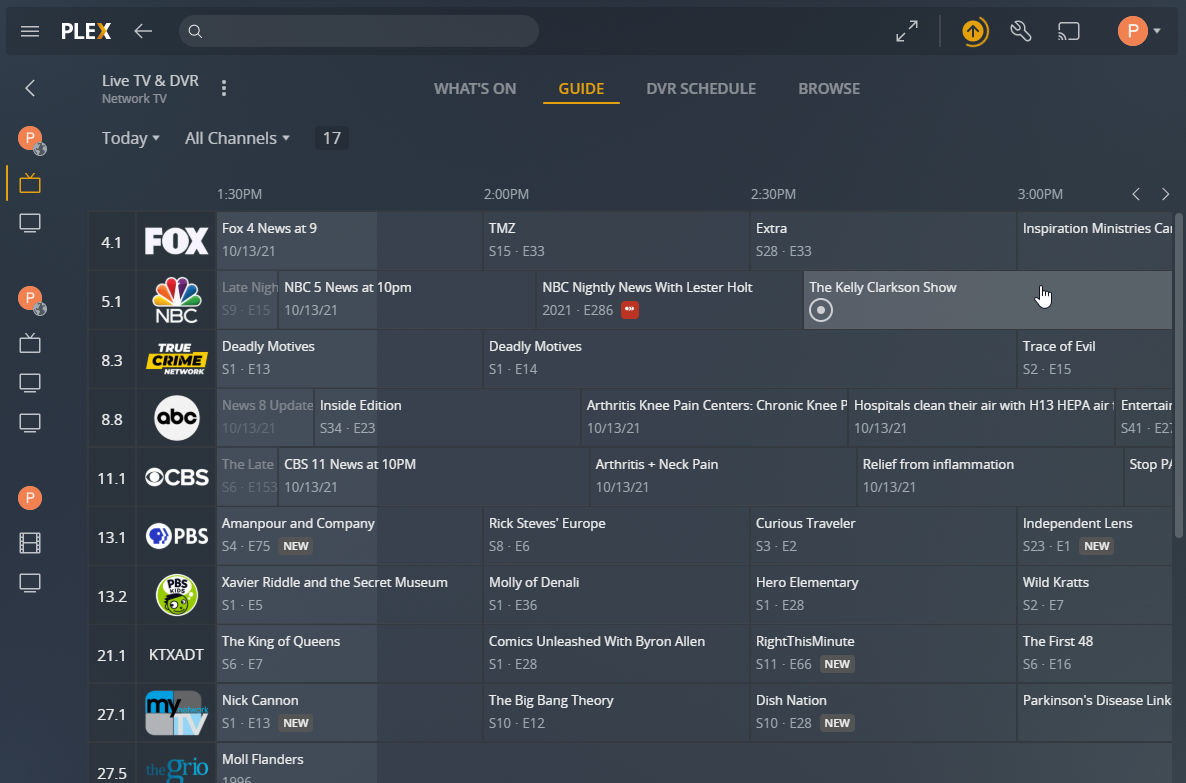
It also has the ability to connect to a TV tuner and record shows directly from your TV antenna. It then integrates all your movies / tv into a large multi-media collection. Watch live TV from your antenna or anything you have chosen to record. It has a TV guide system built in, you can select to record any TV show or series automatically.

A complete TV guide of all your channels, lets you find what you want to watch or record.

Oh, best of all, you can connect remotely from any device with no crazy authentication system like Tablo.

I paired the Plex Media Server with tuner called HD HomeRun, I believe they have models that can tune from 1 – 4 channels at a time.

The Result

I am quite happy with my current setup I can have 10+ users connected and watching TV with no issues at all.

I will not be going back to Tablo anytime soon.

Building An Economical Waterproof Shower

The last few years have introduced many shower systems, such as KERDI-BOARD. These solutions are expensive and unnecessary.

Here are the steps to produce a waterproof shower without breaking the bank.

Use mold resistant drywall around your shower area.

Rather than closing up the seams with drywall mud, use a product like LePage 2 in 1 Seal & Bond.

Apply 3 coats of RedGard® Crack Prevention and Waterproofing Membrane.

You now have a waterproof shower, go ahead – take a shower.

That is all that is needed, you are ready for tile.
For tiles that are 8? to 16?, test coverage using a 1/4? x 3/8? U or Square notch.

A couple notes for myself:

3M 61 spray glue

TYTAN Drywall Pro Adhesive / Lepage PL 200

CertainTeed Premixed Texture “Spray-Lite” – Rona

Filling voids & mesh tape = (USG Easy Sand 20/45/90) / CGC Sheetrock 45
Final coat = CGC Classic Finish (must use 150+ sandpaper)

Ceph Cluster – A 2nd Try?

Back in August 2016 I wanted to try and build a Ceph cluster.  A the time one of the only Single Board Computer (SBC) with a SATA port was the Banana PI.

I bought a few 3tb hard drives (2.5 inch), 4 Banana PI machines and some Odroid C2 machines to use as controllers.

It was very easy to setup the Ceph cluster, but the performance was terrible.  For Ceph to work you really need a high speed back channel for machines to replicate between.

I deployed the hardware for other purposes and called the experiment a failure.

Today I found this post on reddit.  Turns out Hardkernel has released a machine called Odroid-HC2.  It integrated a SBC with passive cooling and the ability to directly connect a 3.5 inch drive up to 12tb.

The guy on reddit deployed glusterfs on 20 of them, apparently glusterfs does not use so much bandwidth to keep the cluster in sync.  His performance numbers are impressive.

I’m not going to build out a cluster of these at this time, but it certainly looks like a fun project.

Syncthing

Everyone and their dog has used Dropbox in the past.  It is good, but commercial and your data is stored in the cloud.

Another option is Resilio, a nice application but I don’t find it stable enough for production use.

I have found Syncthing, open source and your data is not stored in the cloud.  I’m  testing it out on several Windows machines and a couple Linux machines.

Installing on Linux (Debian) from the Debian package was easy enough, but it does not complete the install. 🙁

On top of that the documentation is currently out of date and/or not correct on how to get the thing running as a service.

I found this page that goes over how to get it running, the instructions even work unlike a number of others I have found.

Another thing that is not clear, is where the configuration file is.  If you start it using systemctrl as per the instructions (assuming username is user1), the system creates a default config file at: 

/home/user1/.config/syncthing/config.xml

I assume this is all done so each individual user can  set it up on the machine and have their own configuration…  of course in that way you have multiple people using the same port but guess they can fight over that.

The following commands could be used to enable the service (assuming username is user1)

systemctl enable syncthing@user1.service

With the service enabled it will start automatically on a restart.

If you want to stop/start or get the status while running, use these commands:

systemctl start syncthing@user1.service
systemctl stop syncthing@user1.service
systemctl status syncthing@user1.service

Builing A Deck With No Screws

Well, not exactly no screws but how about no screws that can be seen?  I have viewed a couple YouTube deck builders who were making decks while screwing in from the sides.

Today I found the tool that can do this easily.  It is called the Camo Marksman, from a company called Camo Fasteners.  You place it over your board and it automatically spaces the board and allows you to screw in from the side.

The result is a very clean looking deck, love it.

Shared Space Temperature Controls

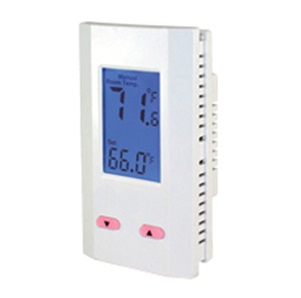
Doing some research on thermostats, specifically ones that can be ‘locked’ so people can’t mess with them. Ideal for landlords or shared spaces like hallways.

Here is what I found:

Chicago Controls (AKA landlordstat.com) – their stuff is a bit limiting in the temperature ranges they offer. Can’t be changed by a tenant as the temperature is burned into the motherboard.

King Electronics offers several models that are programmable, most are set by jumpers on the motherboard so easily altered by tenants. Available from Amazon, also found e-volt in Canada that sells them.

Accustat they market a product line that the temperature is controlled by installing different mercury-based thermometer ‘keys’. You order the thermometer that relates to the temperature you want to set. Interesting idea.

Crashplan Kicks Customers to the Curb

CrashPlan announced a couple days ago that they will no longer offer their services to consumers. If you were using their service, you have about 14 months to find an alternative.

I have already started – I uninstalled CrashPlan and looking at alternatives.

What are your options now? You may want to look at BackBlaze, they have a nice looking service.

OMG! Did she just FART?

You got married a couple years ago, living in an apartment.

Now you are thinking about starting a family, so the two of you save up and purchase a condo. A generously sized three bedroom in a good school district. Best of all, the building is quite new, only a couple years old.

The big day comes, you get possession and move in – how exciting. You have not met the neighbors yet, perhaps you should take over an apple pie and introduce yourself? Maybe later in the week, once you have finished unpacking.

After a few hours of unpacking you are both exhausted and sitting on the couch quietly, looking over the mountain of unpacking you still have left but very content to be in your brand new home.

Then you hear it.

The neighbors upstairs must have just come home. You clearly heard them open the door and voices talking. They are talking about a new toothpaste they purchased while out getting groceries for the week.

Now they are unpacking the groceries, you hear the fridge door open and close, the cabinet doors banging. The voices continue, they just can’t stop talking about that new toothpaste.

Then you hear it, a massive FART from upstairs! There was no mistake, it was as clear as day.

A female voice says ‘excuse me’.

Your first thought OMG, did she just FART?

Your second thought, how can you be hearing every word and every FART from the unit upstairs?

Has your new condo not got any sound proofing between units? If you can hear them, can they hear you? Did the builder not follow sound insulation standards?

If your new condo is wood construction, odds are good the builder did follow the minimum sound insulation standards. Unfortunately, builders rarely do more than the minimum.

The end result is you end up living in structure that has very annoying sound issues and lack of privacy for everyone.

What can do you about the sounds from the neighbors upstairs, you can’t expect them to whisper and walk on their tip toes all the time.

There are two types of sound, the first is airborne sound such as speaking and the mids and highs of music or TV.

The other type of sound is low frequency, this is sound such as bass from music, your neighbors footsteps or dropping things on the floor.

To attack these sounds issues you must take a multi prong approach and it is not cheap, if you skip some steps you can greatly reduce or totally negate the benefits of your attempt to sound proof. Sound is like water; if you have any “leaks,” it will find a way in.

Lets take a look at what options are available to property sound proof your ceiling (their floor) to hopefully give you back as much of your privacy as possible. We assume that the unit on top is not willing to make any changes to their property, such as sound deadening or alterations to their flooring.

Step #1

Remove the existing drywall from your ceiling. Remove any insulation that exists (hopefully there was some!).

If you are careful when removing your existing drywall, you can recycle it. This increases the mass and will help reduce sound – a much better use for it than tossing it out. Cut strips of drywall to fit in between the ceiling joists. Apply Green Glue on the strips and screw into the underside of the sub floor, sandwiching the green glue between the sub floor and drywall.

You can double up by doing the same thing with another strip of drywall over the first.

Step #2

Install Roxul SAFE’n’SOUND which does an excellent job at stopping the mids and highs but does little to nothing to stop the low frequency sounds of footfall or items dropping on the floor.

Step #3

All light boxes or electric junction boxes that exist in your ceiling need to be encased with an acoustical sealant or sound will leak right through those boxes – negating all your hard work and expense. Consider products such as QuietPutty or ATS Acoustics Putty Pads.

If you have any holes in your ceiling for cables, smoke detectors or recessed lighting, everything must be protected with acoustical protection. Even one hole will allow sound to easily pass.

Step #4

Now comes the important step to block low frequency noise.

You need to install your ceiling again but it must be decoupled from the walls and floor above as much as possible. You can use a product such as Green Glue Noiseproofing Clips, The WhisperClip or Kinetics Wave Hanger. For those budget conscious, consider the Resilient A237 clip. All things being equal the Whisper Clip delivers an STC score of 60, A237 delivers 57 vs using no clips delivers a score of 42.

Install your choice of clip in conjunction with drywall furring channel, the clips are expensive ranging in price from $5.00 – $10.00 for each clip.

Next mount a double set of 5/8″ drywall onto your furring channels. If you have lots of cash available for this project, consider adding Green Glue between your 5/8″ drywall sheets or even use QuietRock 530 for maximum noise reduction.

Here is THE MOST IMPORTANT PART to stopping the low frequency noise. Your ceiling must not touch the walls – yep, you read that correctly. You must leave a 1/8″ gap between your ceiling drywall and your walls. Fill the 1/8″ gap using a non-hardening, paintable, resilient acoustical caulk such as QuietSeal Pro (it is blue) or OSI SC175 (it is white).

Do NOT tape or mud the ceiling drywall to your walls. The acoustical caulk must the the only connection, this prevents the low frequency sound from traveling down your walls.

The general consensus among sound experts is to use the lowest price clips and spend your savings adding more mass in the form of additional layers of drywall.

Additional Tips

  • You will need to lower any lights or fans that existed in your ceiling as your new ceiling will be several inches lower as a result of the clips, furring channel and double drywall.

At this point you should have a massive improvement in sound blocking, you are ready to tape, mud and paint your ceiling.

If you have access to the flooring above you, consider installing a product like Peacemaker or Rubber Underlay for Floors. In Canada Foam Solutions makes quite a few different underlay products.

With a little luck, you will no longer be able to hear your neighbor FART!